
Your Dataset Deserves More than a First Row Header
Colectica for Microsoft Excel Standard Edition is a free tool to document your spreadsheet data using the open standard for data documentation.
Standard
$0 free
Download Free »- Document Datasets
- Document Variables
- Publish Documentation
- DDI-Lifecycle Metadata
- Copy table as Markdown
Professional
$1 per month billed yearly
Subscribe »- All Standard Features
- Import Spss to Excel
- Import Stata to Excel
- Import SAS to Excel
- Email Support
Recommended
Professional
$49 one time
Purchase »- All Standard Features
- Perpetual License
- Import Spss to Excel
- Import Stata to Excel
- Import SAS to Excel
- Email Support
Site License
Contact Us quotes available
Request Quote »- All Professional Features
- Unlimited Users
- Support Contract
- Custom Integrations
Works on Microsoft Windows 7 SP1, Windows 8.1, Windows 10 v1607 and above, and Windows 11.
Works with Microsoft Excel 2007 SP3, 2010, 2013, 2016, 2019, 2021, and desktop 365.
Document Variables and Datasets
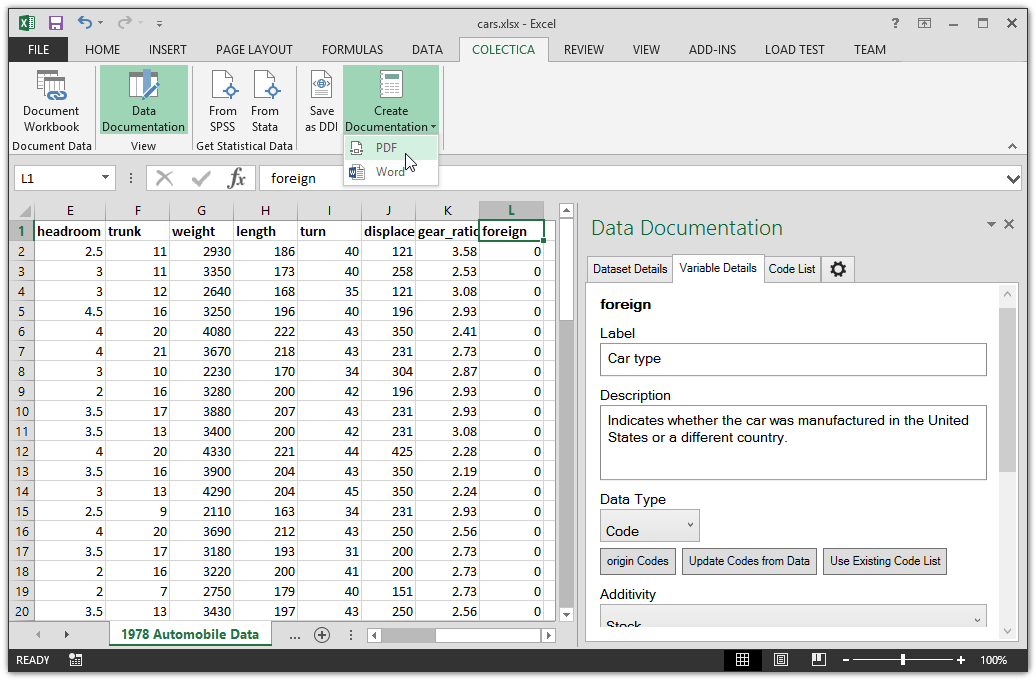
Colectica allows documenting of Variables, Code Lists, and Data Sets directly from within Microsoft Excel.
Metadata is Embedded
Colectica saves your standards-based metadata directly in the Microsoft Excel file. If you email or share your file, the metadata will still be attached.
Publish Documentation
Colectica for Excel can generate documentation for your Variables, Code Lists, and dataset in PDF, Word, and HTML.
Import SAS to Excel
Colectica for Excel Professional allows direct importing and documenting of SAS data files with a file extension .sas7bdat, and SAS catalog files with an extension .sas7bcat. The variable names, labels and code lists in the SAS file will also be imported and added to the stored documentation automatically.
Import Stata to Excel
Colectica for Excel Professional allows direct importing and documenting of Stata data files, with a file extension .dta. The variable names, labels and code lists in the Stata file will also be imported and added to the stored documentation automatically.
Import SPSS to Excel
Colectica for Excel Professional allows direct importing and documenting of SPSS data files, with a file extension .sav. The variable names, labels and code lists in the SPSS file will also be imported and added to the stored documentation automatically.
Create DDI-Lifecycle Metadata
Export your data documentation to an XML file in the DDI metadata format, the standard for data documentation. Open and edit it from Colectica Designer, Colectica Express, or other DDI applications.
Want to document even more?
Or, contact us about our metadata consulting, metadata preparation, or custom development services.


